คำแนะนำในการเพิ่มโลโก้แบรนด์ลงในคิวอาร์โค้ดบน qrcode-gen.com

ในยุคดิจิทัล แบรนด์จำเป็นต้องโดดเด่นในทุกจุดสัมผัสเพื่อสร้างความประทับใจที่แข็งแกร่งให้กับผู้ใช้ QR code ได้กลายเป็นเครื่องมือยอดนิยมสำหรับการเชื่อมต่อข้อมูลดิจิทัลอย่างรวดเร็ว ไม่ว่าจะเป็นเว็บไซต์ เมนู โปรไฟล์ส่วนตัว หรือแคมเปญการตลาด อย่างไรก็ตาม ท่ามกลาง QR code ที่คล้ายกันนับพัน รหัสของแบรนด์คุณจะโดดเด่นและสร้างความประทับใจที่ยั่งยืนได้อย่างไร?


ทางออกสำคัญคือการเพิ่มการปรากฏตัวของแบรนด์ในทุกจุดสัมผัส โดยเฉพาะการผสานโลโก้แบรนด์ของคุณลงไปใน QR code โดยตรง เมื่อโลโก้ของคุณปรากฏอยู่บน QR code ทุกครั้งที่ลูกค้าสแกน แบรนด์ของคุณจะเข้าสู่การรับรู้ของพวกเขา ช่วยเพิ่มการจดจำและสร้างความไว้วางใจที่แข็งแกร่งขึ้น ใช้ประโยชน์จากทุกโอกาส ไม่ว่าจะเป็นบรรจุภัณฑ์สินค้า ป้ายโฆษณา โปสเตอร์ หรือสื่อประชาสัมพันธ์ เพื่อให้แบรนด์ของคุณอยู่กับทุกการปฏิสัมพันธ์ของลูกค้า


ทำไมควรใส่โลโก้ลงใน QR code?

1. เพิ่มการจดจำแบรนด์

QR code ธรรมดาคือกลุ่มของสี่เหลี่ยมสีขาวดำ แต่เมื่อคุณใส่โลโก้ของคุณไว้ตรงกลาง QR code ลูกค้าจะจดจำแบรนด์ของคุณได้ทันทีก่อนที่จะสแกน นี่คือวิธีง่ายๆ ในการ:

  • สร้างความประทับใจตั้งแต่แรกเห็น
     
  • ช่วยให้ลูกค้าจดจำโลโก้และภาพลักษณ์แบรนด์ของคุณ
     
  • เพิ่มความเป็นมืออาชีพในสายตาของคู่ค้าและลูกค้า
     

2. เพิ่มความไว้วางใจ – ลดความลังเลในการสแกน

ผู้ใช้มักลังเลเมื่อเจอ QR code ที่ไม่ทราบแหล่งที่มา การแสดงโลโก้ไว้ตรงกลางโค้ดช่วยให้ลูกค้ารู้แน่ชัดว่า QR code นั้นนำไปที่ใด (เมนูร้านอาหาร เว็บไซต์บริษัท ฯลฯ) และรู้สึกมั่นใจมากขึ้นเมื่อสแกน โดยเฉพาะในแคมเปญการตลาด
 

3. ดูเป็นส่วนตัวและสวยงามมากขึ้น

QR code ที่มีโลโก้จะดูมืออาชีพและสวยงามสอดคล้องกับอัตลักษณ์แบรนด์ของคุณ นี่คือจุดเด่นเมื่อใช้บนบัตรธุรกิจ บรรจุภัณฑ์สินค้า สแตนดี้/โฆษณา หรือหน้าแลนดิ้งเพจงานอีเวนต์ ฯลฯ
 

สร้าง QR code พร้อมโลโก้ด้วย qrcode-gen.com

ขั้นตอนที่ 1: เข้าสู่แพลตฟอร์ม qrcode-gen.com

ไปที่เว็บไซต์ทางการ: https://qrcode-gen.com

นี่คือหนึ่งในเว็บไซต์สร้าง QR code ฟรี ไม่ต้องลงทะเบียน และรองรับฟีเจอร์แทรกโลโก้ได้ง่าย

ขั้นตอนที่ 2: เลือกประเภท QR code ที่ต้องการสร้าง

ในหน้าหลัก คุณจะเห็นตัวเลือกมากมาย:

  • URL
  • vCard
  • vCard Online
  • Text
  • Email
  • Facebook
  • WiFi
  • Phone
  • SMS
  • PDF
     

เลือกฟอร์แมตการแสดงผลที่คุณต้องการให้ QR code แสดง แล้วกรอกลิงก์ลงในช่อง
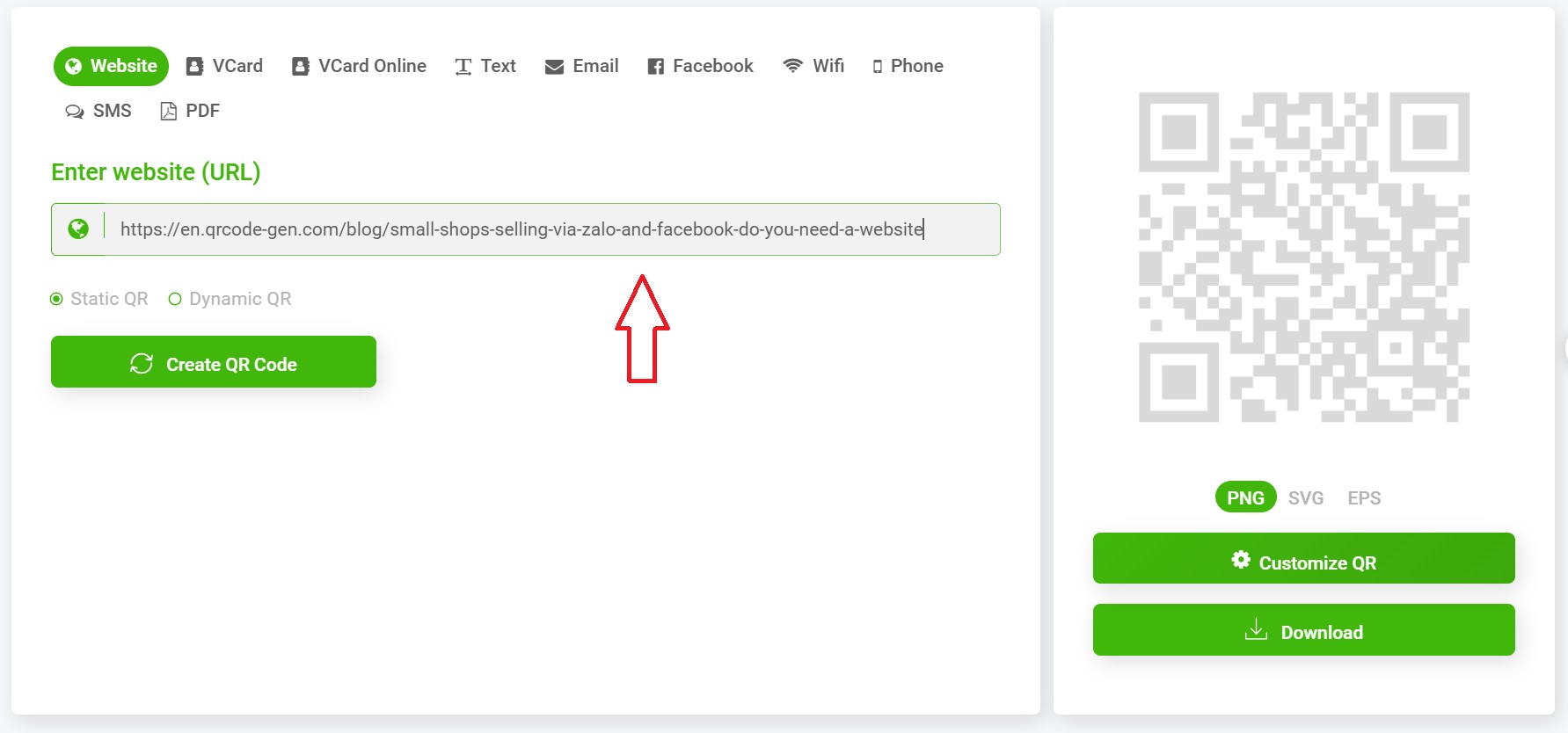
ขั้นตอนที่ 3: กรอกลิงก์และเลือก “Create QR Code”

กรอกลิงก์หรือเนื้อหาลงในช่องที่กำหนด → คลิกปุ่ม “Create QR Code”

QR code ต้นฉบับ (ยังไม่มีโลโก้) จะถูกสร้างขึ้นทันที


ขั้นตอนที่ 4: ปรับแต่ง QR code

ในขั้นตอนนี้ คุณสามารถ:

  • เปลี่ยนสีของ QR code (สีหลัก, สีพื้นหลัง)
     
  • เลือกรูปแบบมุม, กรอบ
     
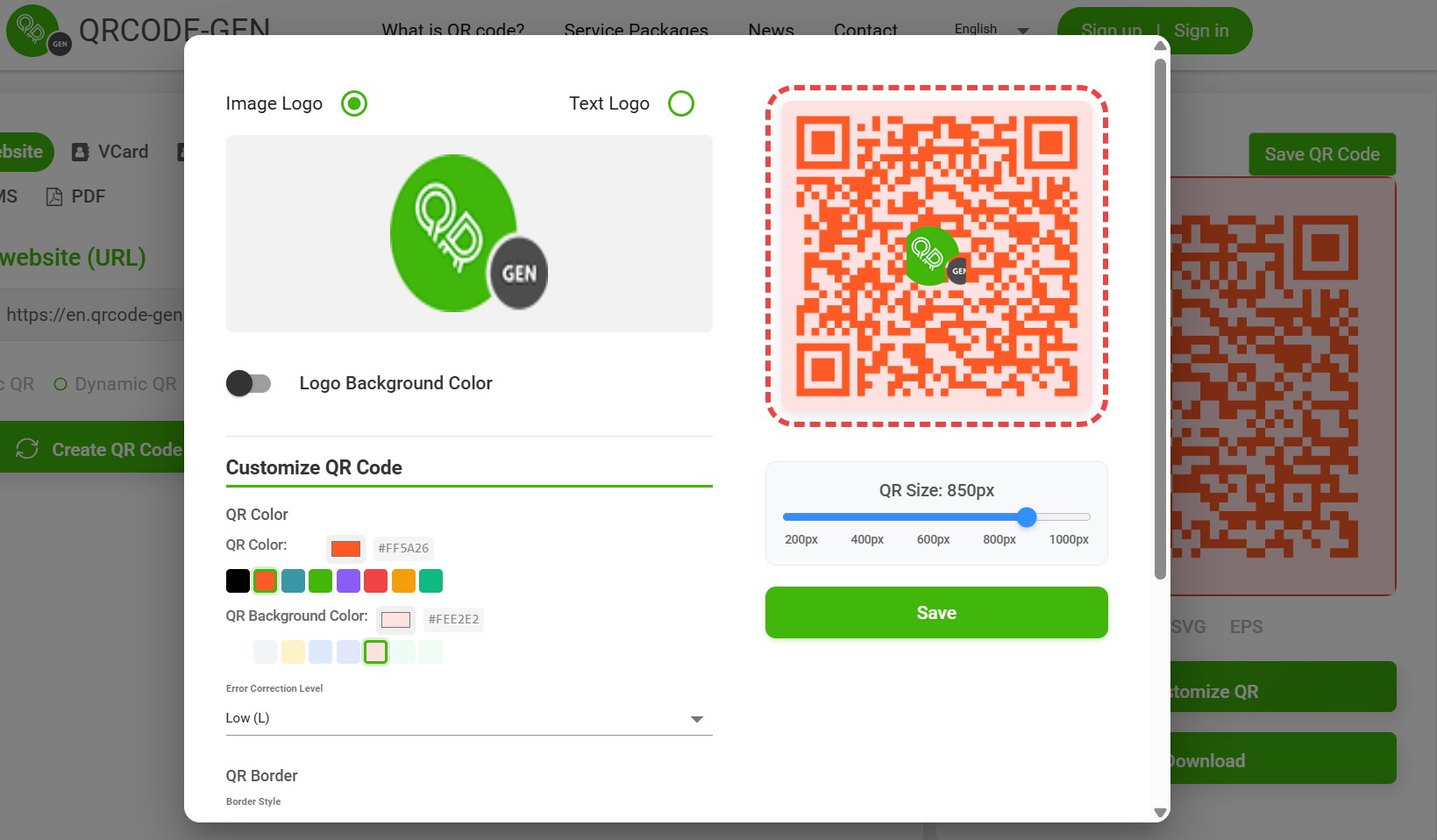
  • เปิดโหมด “Add logo” หรือ “Upload Logo
     

ขั้นตอนที่ 5: ใส่โลโก้ของคุณ

  • เลือก "Upload Image"
     
  • อัปโหลดโลโก้ของคุณในรูปแบบ PNG หรือ JPG (ควรเป็นพื้นหลังโปร่งใส)
     
  • ปรับขนาดโลโก้และวางไว้ตรงกลาง
     

เคล็ดลับ:

  • โลโก้ควรเป็นสี่เหลี่ยมจัตุรัสเพื่อป้องกันการบิดเบี้ยว
     
  • ขนาดโลโก้ไม่ควรใหญ่เกินไปเพื่อให้ QR code ยังสามารถสแกนได้ง่าย
     

ขั้นตอนที่ 6: ดาวน์โหลด QR code

หลังจากใส่โลโก้และปรับแต่งเรียบร้อยแล้ว ให้เลือก:

  • PNG สำหรับใช้บนเว็บไซต์หรือโซเชียลมีเดีย
     
  • SVG สำหรับงานพิมพ์คุณภาพสูง
     

เคล็ดลับการใช้ QR code พร้อมโลโก้ให้ได้ผลสูงสุด

1. ให้สแกนได้ง่าย

ไม่ว่า QR code จะสวยแค่ไหน เป้าหมายหลักคือต้องสามารถสแกนได้ดังนั้น:

  • หลีกเลี่ยงการใช้พื้นหลังที่สว่างหรือจางเกินไป
     
  • อย่าให้โลโก้ปิดทับตรงกลาง QR code ทั้งหมด
     
  • {"props":{"pageProps":{"pathname":"/blog/instructions-for-adding-a-brand-logo-to-a-qr-code-on-qrcode-gen-com-QQXK0R27","metadata":{"title":"คำแนะนำในการเพิ่มโลโก้แบรนด์ลงในคิวอาร์โค้ดบน qrcode-gen.com | QRCode GEN","description":"ในยุคดิจิทัล แบรนด์จำเป็นต้องโดดเด่นในทุกจุดสัมผัสเพื่อสร้างความประทับใจที่แข็งแกร่งให้กับผู้ใช้ QR code ได้กลายเป็นเครื่องมือยอดนิยมสำหรับการเชื่อมต่อข...","keywords":"","language":"th","alternates":{"canonical":"https://th.qrcode-gen.com/blog/instructions-for-adding-a-brand-logo-to-a-qr-code-on-qrcode-gen-com-QQXK0R27","languages":{"th":"https://th.qrcode-gen.com/blog/instructions-for-adding-a-brand-logo-to-a-qr-code-on-qrcode-gen-com-QQXK0R27"},"xDefault":"https://th.qrcode-gen.com/blog/instructions-for-adding-a-brand-logo-to-a-qr-code-on-qrcode-gen-com-QQXK0R27"},"openGraph":{"type":"article","url":"https://th.qrcode-gen.com/blog/instructions-for-adding-a-brand-logo-to-a-qr-code-on-qrcode-gen-com-QQXK0R27","title":"คำแนะนำในการเพิ่มโลโก้แบรนด์ลงในคิวอาร์โค้ดบน qrcode-gen.com | QRCode GEN","description":"ในยุคดิจิทัล แบรนด์จำเป็นต้องโดดเด่นในทุกจุดสัมผัสเพื่อสร้างความประทับใจที่แข็งแกร่งให้กับผู้ใช้ QR code ได้กลายเป็นเครื่องมือยอดนิยมสำหรับการเชื่อมต่อข...","images":["https://media.ninecode.vn/api/files/view?id=23FC057R"],"imageAlt":"คำแนะนำในการเพิ่มโลโก้แบรนด์ลงในคิวอาร์โค้ดบน qrcode-gen.com | QRCode GEN","locale":"th_TH","siteName":"QR Code Generator"},"twitter":{"card":"summary_large_image","url":"https://th.qrcode-gen.com/blog/instructions-for-adding-a-brand-logo-to-a-qr-code-on-qrcode-gen-com-QQXK0R27","title":"คำแนะนำในการเพิ่มโลโก้แบรนด์ลงในคิวอาร์โค้ดบน qrcode-gen.com | QRCode GEN","description":"ในยุคดิจิทัล แบรนด์จำเป็นต้องโดดเด่นในทุกจุดสัมผัสเพื่อสร้างความประทับใจที่แข็งแกร่งให้กับผู้ใช้ QR code ได้กลายเป็นเครื่องมือยอดนิยมสำหรับการเชื่อมต่อข...","images":["https://media.ninecode.vn/api/files/view?id=23FC057R"],"site":"@qrcodegen"},"robots":{"index":true,"follow":true,"maxSnippet":-1,"maxImagePreview":"large","maxVideoPreview":-1},"other":{"og:site_name":"QR Code Generator","article:published_time":"2025-06-04T14:34:48.965Z","article:modified_time":"2025-06-04T14:34:48.965Z"},"jsonLd":[{"@context":"https://schema.org","@type":"Organization","name":"QR Code Gen","url":"https://qrcode-gen.com","logo":"https://qrcode-gen.com/logo.png"},{"@context":"https://schema.org","@type":"WebSite","name":"QR Code Gen","url":"https://qrcode-gen.com"},{"@context":"https://schema.org","@type":"Article","headline":"คำแนะนำในการเพิ่มโลโก้แบรนด์ลงในคิวอาร์โค้ดบน qrcode-gen.com | QRCode GEN","description":"ในยุคดิจิทัล แบรนด์จำเป็นต้องโดดเด่นในทุกจุดสัมผัสเพื่อสร้างความประทับใจที่แข็งแกร่งให้กับผู้ใช้ QR code ได้กลายเป็นเครื่องมือยอดนิยมสำหรับการเชื่อมต่อข...","image":"https://media.ninecode.vn/api/files/view?id=23FC057R","author":{"@type":"Organization","name":"QR Code Gen"},"publisher":{"@type":"Organization","name":"QR Code Gen"},"mainEntityOfPage":{"@type":"WebPage","@id":"https://th.qrcode-gen.com/blog/instructions-for-adding-a-brand-logo-to-a-qr-code-on-qrcode-gen-com-QQXK0R27"}},{"@context":"https://schema.org","@type":"BreadcrumbList","itemListElement":[{"@type":"ListItem","position":1,"name":"Home","item":"https://th.qrcode-gen.com/"},{"@type":"ListItem","position":2,"name":"Blog","item":"https://th.qrcode-gen.com/blog"},{"@type":"ListItem","position":3,"name":"instructions-for-adding-a-brand-logo-to-a-qr-code-on-qrcode-gen-com-QQXK0R27","item":"https://th.qrcode-gen.com/blog/instructions-for-adding-a-brand-logo-to-a-qr-code-on-qrcode-gen-com-QQXK0R27"}]}]},"serverContent":{"type":"blog-detail","title":"คำแนะนำในการเพิ่มโลโก้แบรนด์ลงในคิวอาร์โค้ดบน qrcode-gen.com","createdAt":"2025-06-04T14:34:48.965Z","updatedAt":"","datePublishedIso":"2025-06-04T14:34:48.965Z","dateModifiedIso":"2025-06-04T14:34:48.965Z","briefContent":"\u003cp>\u003cspan style=\"font-size:11pt; font-variant:normal; white-space:pre-wrap\">\u003cspan style=\"font-family:Arial,sans-serif\">\u003cspan style=\"color:#000000\">\u003cspan style=\"font-weight:400\">\u003cspan style=\"font-style:normal\">\u003cspan style=\"text-decoration:none\">ในยุคดิจิทัล แบรนด์จำเป็นต้องโดดเด่นในทุกจุดสัมผัสเพื่อสร้างความประทับใจที่แข็งแกร่งให้กับผู้ใช้ QR code ได้กลายเป็นเครื่องมือยอดนิยมสำหรับการเชื่อมต่อข้อมูลดิจิทัลอย่างรวดเร็ว ไม่ว่าจะเป็นเว็บไซต์ เมนู โปรไฟล์ส่วนตัว หรือแคมเปญการตลาด อย่างไรก็ตาม ท่ามกลาง QR code ที่คล้ายกันนับพัน รหัสของแบรนด์คุณจะโดดเด่นและสร้างความประทับใจที่ยั่งยืนได้อย่างไร?\u003c/span>\u003c/span>\u003c/span>\u003c/span>\u003c/span>\u003c/span>\u003c/p>\n\n\u003cp> \u003c/p>\n\n\u003cp style=\"line-height:1.38; text-align:justify\">\u003cspan style=\"font-size:11pt; font-variant:normal; white-space:pre-wrap\">\u003cspan style=\"font-family:Arial,sans-serif\">\u003cspan style=\"color:#000000\">\u003cspan style=\"font-weight:400\">\u003cspan style=\"font-style:normal\">\u003cspan style=\"text-decoration:none\">ทางออกสำคัญคือการเพิ่มการปรากฏตัวของแบรนด์ในทุกจุดสัมผัส โดยเฉพาะการผสานโลโก้แบรนด์ของคุณลงไปใน QR code โดยตรง เมื่อโลโก้ของคุณปรากฏอยู่บน QR code ทุกครั้งที่ลูกค้าสแกน แบรนด์ของคุณจะเข้าสู่การรับรู้ของพวกเขา ช่วยเพิ่มการจดจำและสร้างความไว้วางใจที่แข็งแกร่งขึ้น ใช้ประโยชน์จากทุกโอกาส ไม่ว่าจะเป็นบรรจุภัณฑ์สินค้า ป้ายโฆษณา โปสเตอร์ หรือสื่อประชาสัมพันธ์ เพื่อให้แบรนด์ของคุณอยู่กับทุกการปฏิสัมพันธ์ของลูกค้า\u003c/span>\u003c/span>\u003c/span>\u003c/span>\u003c/span>\u003c/span>\u003c/p>\n\n\u003cp> \u003c/p>\n\n\u003cp style=\"line-height:1.38\">\u003cspan style=\"font-size:17pt; font-variant:normal; white-space:pre-wrap\">\u003cspan style=\"font-family:Arial,sans-serif\">\u003cspan style=\"color:#000000\">\u003cspan style=\"font-weight:700\">\u003cspan style=\"font-style:normal\">\u003cspan style=\"text-decoration:none\">ทำไมควรใส่โลโก้ลงใน QR code?\u003c/span>\u003c/span>\u003c/span>\u003c/span>\u003c/span>\u003c/span>\u003c/p>\n\n\u003ch3 style=\"line-height:1.38; margin-top:19px; margin-bottom:5px\">\u003cspan style=\"font-size:13pt; font-variant:normal; white-space:pre-wrap\">\u003cspan style=\"font-family:Arial,sans-serif\">\u003cspan style=\"color:#000000\">\u003cspan style=\"font-weight:700\">\u003cspan style=\"font-style:normal\">\u003cspan style=\"text-decoration:none\">1. เพิ่มการจดจำแบรนด์\u003c/span>\u003c/span>\u003c/span>\u003c/span>\u003c/span>\u003c/span>\u003c/h3>\n\n\u003cp style=\"line-height:1.38; margin-top:16px; margin-bottom:16px\">\u003cspan style=\"font-size:11pt; font-variant:normal; white-space:pre-wrap\">\u003cspan style=\"font-family:Arial,sans-serif\">\u003cspan style=\"color:#000000\">\u003cspan style=\"font-weight:400\">\u003cspan style=\"font-style:normal\">\u003cspan style=\"text-decoration:none\">QR code ธรรมดาคือกลุ่มของสี่เหลี่ยมสีขาวดำ แต่เมื่อคุณใส่โลโก้ของคุณไว้ตรงกลาง QR code ลูกค้าจะ\u003c/span>\u003c/span>\u003c/span>\u003c/span>\u003c/span>\u003c/span>\u003cspan style=\"font-size:11pt; font-variant:normal; white-space:pre-wrap\">\u003cspan style=\"font-family:Arial,sans-serif\">\u003cspan style=\"color:#000000\">\u003cspan style=\"font-weight:700\">\u003cspan style=\"font-style:normal\">\u003cspan style=\"text-decoration:none\">จดจำแบรนด์ของคุณได้ทันที\u003c/span>\u003c/span>\u003c/span>\u003c/span>\u003c/span>\u003c/span>\u003cspan style=\"font-size:11pt; font-variant:normal; white-space:pre-wrap\">\u003cspan style=\"font-family:Arial,sans-serif\">\u003cspan style=\"color:#000000\">\u003cspan style=\"font-weight:400\">\u003cspan style=\"font-style:normal\">\u003cspan style=\"text-decoration:none\">ก่อนที่จะสแกน นี่คือวิธีง่ายๆ ในการ:\u003c/span>\u003c/span>\u003c/span>\u003c/span>\u003c/span>\u003c/span>\u003c/p>\n\n\u003cul>\n\t\u003cli aria-level=\"1\" style=\"list-style-type:disc\">\u003cspan style=\"font-size:11pt; font-variant:normal; white-space:pre-wrap\">\u003cspan style=\"font-family:Arial,sans-serif\">\u003cspan style=\"color:#000000\">\u003cspan style=\"font-weight:400\">\u003cspan style=\"font-style:normal\">\u003cspan style=\"text-decoration:none\">สร้างความประทับใจตั้งแต่แรกเห็น\u003c/span>\u003c/span>\u003c/span>\u003c/span>\u003c/span>\u003c/span>\u003cbr />\n\t \u003c/li>\n\t\u003cli aria-level=\"1\" style=\"list-style-type:disc\">\u003cspan style=\"font-size:11pt; font-variant:normal; white-space:pre-wrap\">\u003cspan style=\"font-family:Arial,sans-serif\">\u003cspan style=\"color:#000000\">\u003cspan style=\"font-weight:400\">\u003cspan style=\"font-style:normal\">\u003cspan style=\"text-decoration:none\">ช่วยให้ลูกค้าจดจำโลโก้และภาพลักษณ์แบรนด์ของคุณ\u003c/span>\u003c/span>\u003c/span>\u003c/span>\u003c/span>\u003c/span>\u003cbr />\n\t \u003c/li>\n\t\u003cli aria-level=\"1\" style=\"list-style-type:disc\">\u003cspan style=\"font-size:11pt; font-variant:normal; white-space:pre-wrap\">\u003cspan style=\"font-family:Arial,sans-serif\">\u003cspan style=\"color:#000000\">\u003cspan style=\"font-weight:400\">\u003cspan style=\"font-style:normal\">\u003cspan style=\"text-decoration:none\">เพิ่มความเป็นมืออาชีพในสายตาของคู่ค้าและลูกค้า\u003c/span>\u003c/span>\u003c/span>\u003c/span>\u003c/span>\u003c/span>\u003cbr />\n\t \u003c/li>\n\u003c/ul>\n\n\u003ch3 style=\"line-height:1.38; margin-top:19px; margin-bottom:5px\">\u003cspan style=\"font-size:13pt; font-variant:normal; white-space:pre-wrap\">\u003cspan style=\"font-family:Arial,sans-serif\">\u003cspan style=\"color:#000000\">\u003cspan style=\"font-weight:700\">\u003cspan style=\"font-style:normal\">\u003cspan style=\"text-decoration:none\">2. เพิ่มความไว้วางใจ – ลดความลังเลในการสแกน\u003c/span>\u003c/span>\u003c/span>\u003c/span>\u003c/span>\u003c/span>\u003c/h3>\n\n\u003cp style=\"line-height:1.38; margin-top:16px; margin-bottom:16px\">\u003cspan style=\"font-size:11pt; font-variant:normal; white-space:pre-wrap\">\u003cspan style=\"font-family:Arial,sans-serif\">\u003cspan style=\"color:#000000\">\u003cspan style=\"font-weight:400\">\u003cspan style=\"font-style:normal\">\u003cspan style=\"text-decoration:none\">ผู้ใช้มักลังเลเมื่อเจอ QR code ที่ไม่ทราบแหล่งที่มา การแสดงโลโก้ไว้ตรงกลางโค้ดช่วยให้ลูกค้ารู้แน่ชัดว่า QR code นั้นนำไปที่ใด (เมนูร้านอาหาร เว็บไซต์บริษัท ฯลฯ) และรู้สึกมั่นใจมากขึ้นเมื่อสแกน โดยเฉพาะในแคมเปญการตลาด\u003c/span>\u003c/span>\u003c/span>\u003c/span>\u003c/span>\u003c/span>\u003cbr />\n \u003c/p>\n\n\u003ch3 style=\"line-height:1.38; margin-top:19px; margin-bottom:5px\">\u003cspan style=\"font-size:13pt; font-variant:normal; white-space:pre-wrap\">\u003cspan style=\"font-family:Arial,sans-serif\">\u003cspan style=\"color:#000000\">\u003cspan style=\"font-weight:700\">\u003cspan style=\"font-style:normal\">\u003cspan style=\"text-decoration:none\">3. ดูเป็นส่วนตัวและสวยงามมากขึ้น\u003c/span>\u003c/span>\u003c/span>\u003c/span>\u003c/span>\u003c/span>\u003c/h3>\n\n\u003cp style=\"line-height:1.38; margin-top:16px; margin-bottom:16px\">\u003cspan style=\"font-size:11pt; font-variant:normal; white-space:pre-wrap\">\u003cspan style=\"font-family:Arial,sans-serif\">\u003cspan style=\"color:#000000\">\u003cspan style=\"font-weight:400\">\u003cspan style=\"font-style:normal\">\u003cspan style=\"text-decoration:none\">QR code ที่มีโลโก้จะดู\u003c/span>\u003c/span>\u003c/span>\u003c/span>\u003c/span>\u003c/span>\u003cspan style=\"font-size:11pt; font-variant:normal; white-space:pre-wrap\">\u003cspan style=\"font-family:Arial,sans-serif\">\u003cspan style=\"color:#000000\">\u003cspan style=\"font-weight:700\">\u003cspan style=\"font-style:normal\">\u003cspan style=\"text-decoration:none\">มืออาชีพและสวยงาม\u003c/span>\u003c/span>\u003c/span>\u003c/span>\u003c/span>\u003c/span>\u003cspan style=\"font-size:11pt; font-variant:normal; white-space:pre-wrap\">\u003cspan style=\"font-family:Arial,sans-serif\">\u003cspan style=\"color:#000000\">\u003cspan style=\"font-weight:400\">\u003cspan style=\"font-style:normal\">\u003cspan style=\"text-decoration:none\">สอดคล้องกับอัตลักษณ์แบรนด์ของคุณ นี่คือจุดเด่นเมื่อใช้บนบัตรธุรกิจ บรรจุภัณฑ์สินค้า สแตนดี้/โฆษณา หรือหน้าแลนดิ้งเพจงานอีเวนต์ ฯลฯ\u003c/span>\u003c/span>\u003c/span>\u003c/span>\u003c/span>\u003c/span>\u003cbr />\n \u003c/p>\n\n\u003cp style=\"line-height:1.38\">\u003cspan style=\"font-size:17pt; font-variant:normal; white-space:pre-wrap\">\u003cspan style=\"font-family:Arial,sans-serif\">\u003cspan style=\"color:#000000\">\u003cspan style=\"font-weight:700\">\u003cspan style=\"font-style:normal\">\u003cspan style=\"text-decoration:none\">สร้าง QR code พร้อมโลโก้ด้วย qrcode-gen.com\u003c/span>\u003c/span>\u003c/span>\u003c/span>\u003c/span>\u003c/span>\u003c/p>\n\n\u003ch3 style=\"line-height:1.38; margin-top:19px; margin-bottom:5px\">\u003cspan style=\"font-size:13pt; font-variant:normal; white-space:pre-wrap\">\u003cspan style=\"font-family:Arial,sans-serif\">\u003cspan style=\"color:#000000\">\u003cspan style=\"font-weight:700\">\u003cspan style=\"font-style:normal\">\u003cspan style=\"text-decoration:none\">ขั้นตอนที่ 1: เข้าสู่แพลตฟอร์ม qrcode-gen.com\u003c/span>\u003c/span>\u003c/span>\u003c/span>\u003c/span>\u003c/span>\u003c/h3>\n\n\u003cp style=\"line-height:1.38; margin-top:16px; margin-bottom:16px\">\u003cspan style=\"font-size:11pt; font-variant:normal; white-space:pre-wrap\">\u003cspan style=\"font-family:Arial,sans-serif\">\u003cspan style=\"color:#000000\">\u003cspan style=\"font-weight:400\">\u003cspan style=\"font-style:normal\">\u003cspan style=\"text-decoration:none\">ไปที่เว็บไซต์ทางการ:\u003c/span>\u003c/span>\u003c/span>\u003c/span>\u003c/span>\u003c/span>\u003ca href=\"https://qrcode-gen.com\" style=\"text-decoration:none\">\u003cspan style=\"font-size:11pt; font-variant:normal; white-space:pre-wrap\">\u003cspan style=\"font-family:Arial,sans-serif\">\u003cspan style=\"color:#000000\">\u003cspan style=\"font-weight:400\">\u003cspan style=\"font-style:normal\">\u003cspan style=\"text-decoration:none\"> \u003c/span>\u003c/span>\u003c/span>\u003c/span>\u003c/span>\u003c/span>\u003cspan style=\"font-size:11pt; font-variant:normal; white-space:pre-wrap\">\u003cspan style=\"font-family:Arial,sans-serif\">\u003cspan style=\"color:#1155cc\">\u003cspan style=\"font-weight:400\">\u003cspan style=\"font-style:normal\">\u003cspan style=\"text-decoration:underline\">\u003cspan style=\"-webkit-text-decoration-skip:none\">\u003cspan style=\"text-decoration-skip-ink:none\">https://qrcode-gen.com\u003c/span>\u003c/span>\u003c/span>\u003c/span>\u003c/span>\u003c/span>\u003c/span>\u003c/span>\u003c/a>\u003c/p>\n\n\u003cp style=\"line-height:1.38; margin-top:16px; margin-bottom:16px\">\u003cspan style=\"font-size:11pt; font-variant:normal; white-space:pre-wrap\">\u003cspan style=\"font-family:Arial,sans-serif\">\u003cspan style=\"color:#000000\">\u003cspan style=\"font-weight:400\">\u003cspan style=\"font-style:normal\">\u003cspan style=\"text-decoration:none\">นี่คือหนึ่งในเว็บไซต์สร้าง QR code ฟรี ไม่ต้องลงทะเบียน และรองรับฟีเจอร์แทรกโลโก้ได้ง่าย\u003c/span>\u003c/span>\u003c/span>\u003c/span>\u003c/span>\u003c/span>\u003c/p>\n\n\u003ch3 style=\"line-height:1.38; margin-top:19px; margin-bottom:5px\">\u003cspan style=\"font-size:13pt; font-variant:normal; white-space:pre-wrap\">\u003cspan style=\"font-family:Arial,sans-serif\">\u003cspan style=\"color:#000000\">\u003cspan style=\"font-weight:700\">\u003cspan style=\"font-style:normal\">\u003cspan style=\"text-decoration:none\">ขั้นตอนที่ 2: เลือกประเภท QR code ที่ต้องการสร้าง\u003c/span>\u003c/span>\u003c/span>\u003c/span>\u003c/span>\u003c/span>\u003c/h3>\n\n\u003cp style=\"line-height:1.38; margin-top:16px; margin-bottom:16px\">\u003cspan style=\"font-size:11pt; font-variant:normal; white-space:pre-wrap\">\u003cspan style=\"font-family:Arial,sans-serif\">\u003cspan style=\"color:#000000\">\u003cspan style=\"font-weight:400\">\u003cspan style=\"font-style:normal\">\u003cspan style=\"text-decoration:none\">ในหน้าหลัก คุณจะเห็นตัวเลือกมากมาย:\u003c/span>\u003c/span>\u003c/span>\u003c/span>\u003c/span>\u003c/span>\u003c/p>\n\n\u003cul>\n\t\u003cli aria-level=\"1\" style=\"list-style-type:disc\">\u003cspan style=\"font-size:11pt; font-variant:normal; white-space:pre-wrap\">\u003cspan style=\"font-family:Arial,sans-serif\">\u003cspan style=\"color:#000000\">\u003cspan style=\"font-weight:400\">\u003cspan style=\"font-style:normal\">\u003cspan style=\"text-decoration:none\">URL\u003c/span>\u003c/span>\u003c/span>\u003c/span>\u003c/span>\u003c/span>\u003c/li>\n\t\u003cli aria-level=\"1\" style=\"list-style-type:disc\">\u003cspan style=\"font-size:11pt; font-variant:normal; white-space:pre-wrap\">\u003cspan style=\"font-family:Arial,sans-serif\">\u003cspan style=\"color:#000000\">\u003cspan style=\"font-weight:400\">\u003cspan style=\"font-style:normal\">\u003cspan style=\"text-decoration:none\">vCard\u003c/span>\u003c/span>\u003c/span>\u003c/span>\u003c/span>\u003c/span>\u003c/li>\n\t\u003cli aria-level=\"1\" style=\"list-style-type:disc\">\u003cspan style=\"font-size:11pt; font-variant:normal; white-space:pre-wrap\">\u003cspan style=\"font-family:Arial,sans-serif\">\u003cspan style=\"color:#000000\">\u003cspan style=\"font-weight:400\">\u003cspan style=\"font-style:normal\">\u003cspan style=\"text-decoration:none\">vCard Online\u003c/span>\u003c/span>\u003c/span>\u003c/span>\u003c/span>\u003c/span>\u003c/li>\n\t\u003cli aria-level=\"1\" style=\"list-style-type:disc\">\u003cspan style=\"font-size:11pt; font-variant:normal; white-space:pre-wrap\">\u003cspan style=\"font-family:Arial,sans-serif\">\u003cspan style=\"color:#000000\">\u003cspan style=\"font-weight:400\">\u003cspan style=\"font-style:normal\">\u003cspan style=\"text-decoration:none\">Text\u003c/span>\u003c/span>\u003c/span>\u003c/span>\u003c/span>\u003c/span>\u003c/li>\n\t\u003cli aria-level=\"1\" style=\"list-style-type:disc\">\u003cspan style=\"font-size:11pt; font-variant:normal; white-space:pre-wrap\">\u003cspan style=\"font-family:Arial,sans-serif\">\u003cspan style=\"color:#000000\">\u003cspan style=\"font-weight:400\">\u003cspan style=\"font-style:normal\">\u003cspan style=\"text-decoration:none\">Email\u003c/span>\u003c/span>\u003c/span>\u003c/span>\u003c/span>\u003c/span>\u003c/li>\n\t\u003cli aria-level=\"1\" style=\"list-style-type:disc\">\u003cspan style=\"font-size:11pt; font-variant:normal; white-space:pre-wrap\">\u003cspan style=\"font-family:Arial,sans-serif\">\u003cspan style=\"color:#000000\">\u003cspan style=\"font-weight:400\">\u003cspan style=\"font-style:normal\">\u003cspan style=\"text-decoration:none\">Facebook\u003c/span>\u003c/span>\u003c/span>\u003c/span>\u003c/span>\u003c/span>\u003c/li>\n\t\u003cli aria-level=\"1\" style=\"list-style-type:disc\">\u003cspan style=\"font-size:11pt; font-variant:normal; white-space:pre-wrap\">\u003cspan style=\"font-family:Arial,sans-serif\">\u003cspan style=\"color:#000000\">\u003cspan style=\"font-weight:400\">\u003cspan style=\"font-style:normal\">\u003cspan style=\"text-decoration:none\">WiFi\u003c/span>\u003c/span>\u003c/span>\u003c/span>\u003c/span>\u003c/span>\u003c/li>\n\t\u003cli aria-level=\"1\" style=\"list-style-type:disc\">\u003cspan style=\"font-size:11pt; font-variant:normal; white-space:pre-wrap\">\u003cspan style=\"font-family:Arial,sans-serif\">\u003cspan style=\"color:#000000\">\u003cspan style=\"font-weight:400\">\u003cspan style=\"font-style:normal\">\u003cspan style=\"text-decoration:none\">Phone\u003c/span>\u003c/span>\u003c/span>\u003c/span>\u003c/span>\u003c/span>\u003c/li>\n\t\u003cli aria-level=\"1\" style=\"list-style-type:disc\">\u003cspan style=\"font-size:11pt; font-variant:normal; white-space:pre-wrap\">\u003cspan style=\"font-family:Arial,sans-serif\">\u003cspan style=\"color:#000000\">\u003cspan style=\"font-weight:400\">\u003cspan style=\"font-style:normal\">\u003cspan style=\"text-decoration:none\">SMS\u003c/span>\u003c/span>\u003c/span>\u003c/span>\u003c/span>\u003c/span>\u003c/li>\n\t\u003cli aria-level=\"1\" style=\"list-style-type:disc\">\u003cspan style=\"font-size:11pt; font-variant:normal; white-space:pre-wrap\">\u003cspan style=\"font-family:Arial,sans-serif\">\u003cspan style=\"color:#000000\">\u003cspan style=\"font-weight:400\">\u003cspan style=\"font-style:normal\">\u003cspan style=\"text-decoration:none\">PDF\u003c/span>\u003c/span>\u003c/span>\u003c/span>\u003c/span>\u003c/span>\u003cbr />\n\t \u003c/li>\n\u003c/ul>\n\n\u003cp style=\"line-height:1.65; background-color:#ffffff; margin-top:11px; padding:0pt 0pt 21pt 0pt\">\u003cspan style=\"font-size:12pt; font-variant:normal; white-space:pre-wrap\">\u003cspan style=\"font-family:Arial,sans-serif\">\u003cspan style=\"color:#001d35\">\u003cspan style=\"font-weight:400\">\u003cspan style=\"font-style:normal\">\u003cspan style=\"text-decoration:none\">เลือกฟอร์แมตการแสดงผลที่คุณต้องการให้ QR code แสดง แล้วกรอกลิงก์ลงในช่อง\u003c/span>\u003c/span>\u003c/span>\u003c/span>\u003c/span>\u003c/span>\u003c/p>\n\n\u003cp>\u003cimg alt=\"\" src=\"https://media.ninecode.vn/api/files/view?id=VBMC77QQ\" style=\"width: 1783px; height: 834px;\" decoding=\"async\" loading=\"eager\" fetchpriority=\"high\"/>\u003c/p>\n\n\u003ch3 style=\"line-height:1.38; margin-top:19px; margin-bottom:5px\">\u003cspan style=\"font-size:13pt; font-variant:normal; white-space:pre-wrap\">\u003cspan style=\"font-family:Arial,sans-serif\">\u003cspan style=\"color:#000000\">\u003cspan style=\"font-weight:700\">\u003cspan style=\"font-style:normal\">\u003cspan style=\"text-decoration:none\">ขั้นตอนที่ 3: กรอกลิงก์และเลือก “Create QR Code”\u003c/span>\u003c/span>\u003c/span>\u003c/span>\u003c/span>\u003c/span>\u003c/h3>\n\n\u003cp style=\"line-height:1.38; margin-top:16px; margin-bottom:16px\">\u003cspan style=\"font-size:11pt; font-variant:normal; white-space:pre-wrap\">\u003cspan style=\"font-family:Arial,sans-serif\">\u003cspan style=\"color:#000000\">\u003cspan style=\"font-weight:400\">\u003cspan style=\"font-style:normal\">\u003cspan style=\"text-decoration:none\">กรอกลิงก์หรือเนื้อหาลงในช่องที่กำหนด → คลิกปุ่ม “\u003c/span>\u003c/span>\u003c/span>\u003c/span>\u003c/span>\u003c/span>\u003cspan style=\"font-size:13pt; font-variant:normal; white-space:pre-wrap\">\u003cspan style=\"font-family:Arial,sans-serif\">\u003cspan style=\"color:#000000\">\u003cspan style=\"font-weight:400\">\u003cspan style=\"font-style:normal\">\u003cspan style=\"text-decoration:none\">Create \u003c/span>\u003c/span>\u003c/span>\u003c/span>\u003c/span>\u003c/span>\u003cspan style=\"font-size:11pt; font-variant:normal; white-space:pre-wrap\">\u003cspan style=\"font-family:Arial,sans-serif\">\u003cspan style=\"color:#000000\">\u003cspan style=\"font-weight:400\">\u003cspan style=\"font-style:normal\">\u003cspan style=\"text-decoration:none\">QR Code”\u003c/span>\u003c/span>\u003c/span>\u003c/span>\u003c/span>\u003c/span>\u003c/p>\n\n\u003cp style=\"line-height:1.38; margin-top:16px; margin-bottom:16px\">\u003cspan style=\"font-size:11pt; font-variant:normal; white-space:pre-wrap\">\u003cspan style=\"font-family:Arial,sans-serif\">\u003cspan style=\"color:#000000\">\u003cspan style=\"font-weight:400\">\u003cspan style=\"font-style:normal\">\u003cspan style=\"text-decoration:none\">QR code ต้นฉบับ (ยังไม่มีโลโก้) จะถูกสร้างขึ้นทันที\u003c/span>\u003c/span>\u003c/span>\u003c/span>\u003c/span>\u003c/span>\u003c/p>\n\n\u003cp> \u003c/p>\n\n\u003ch3 style=\"line-height:1.38; margin-top:19px; margin-bottom:5px\">\u003cspan style=\"font-size:13pt; font-variant:normal; white-space:pre-wrap\">\u003cspan style=\"font-family:Arial,sans-serif\">\u003cspan style=\"color:#000000\">\u003cspan style=\"font-weight:700\">\u003cspan style=\"font-style:normal\">\u003cspan style=\"text-decoration:none\">ขั้นตอนที่ 4: ปรับแต่ง QR code\u003c/span>\u003c/span>\u003c/span>\u003c/span>\u003c/span>\u003c/span>\u003c/h3>\n\n\u003cp style=\"line-height:1.38; margin-top:16px; margin-bottom:16px\">\u003cspan style=\"font-size:11pt; font-variant:normal; white-space:pre-wrap\">\u003cspan style=\"font-family:Arial,sans-serif\">\u003cspan style=\"color:#000000\">\u003cspan style=\"font-weight:400\">\u003cspan style=\"font-style:normal\">\u003cspan style=\"text-decoration:none\">ในขั้นตอนนี้ คุณสามารถ:\u003c/span>\u003c/span>\u003c/span>\u003c/span>\u003c/span>\u003c/span>\u003c/p>\n\n\u003cul>\n\t\u003cli aria-level=\"1\" style=\"list-style-type:disc\">\u003cspan style=\"font-size:11pt; font-variant:normal; white-space:pre-wrap\">\u003cspan style=\"font-family:Arial,sans-serif\">\u003cspan style=\"color:#000000\">\u003cspan style=\"font-weight:700\">\u003cspan style=\"font-style:normal\">\u003cspan style=\"text-decoration:none\">เปลี่ยนสี\u003c/span>\u003c/span>\u003c/span>\u003c/span>\u003c/span>\u003c/span>\u003cspan style=\"font-size:11pt; font-variant:normal; white-space:pre-wrap\">\u003cspan style=\"font-family:Arial,sans-serif\">\u003cspan style=\"color:#000000\">\u003cspan style=\"font-weight:400\">\u003cspan style=\"font-style:normal\">\u003cspan style=\"text-decoration:none\">ของ QR code (สีหลัก, สีพื้นหลัง)\u003c/span>\u003c/span>\u003c/span>\u003c/span>\u003c/span>\u003c/span>\u003cbr />\n\t \u003c/li>\n\t\u003cli aria-level=\"1\" style=\"list-style-type:disc\">\u003cspan style=\"font-size:11pt; font-variant:normal; white-space:pre-wrap\">\u003cspan style=\"font-family:Arial,sans-serif\">\u003cspan style=\"color:#000000\">\u003cspan style=\"font-weight:400\">\u003cspan style=\"font-style:normal\">\u003cspan style=\"text-decoration:none\">เลือก\u003c/span>\u003c/span>\u003c/span>\u003c/span>\u003c/span>\u003c/span>\u003cspan style=\"font-size:11pt; font-variant:normal; white-space:pre-wrap\">\u003cspan style=\"font-family:Arial,sans-serif\">\u003cspan style=\"color:#000000\">\u003cspan style=\"font-weight:700\">\u003cspan style=\"font-style:normal\">\u003cspan style=\"text-decoration:none\">รูปแบบมุม, กรอบ\u003c/span>\u003c/span>\u003c/span>\u003c/span>\u003c/span>\u003c/span>\u003cbr />\n\t \u003c/li>\n\t\u003cli aria-level=\"1\" style=\"list-style-type:disc\">\u003cspan style=\"font-size:11pt; font-variant:normal; white-space:pre-wrap\">\u003cspan style=\"font-family:Arial,sans-serif\">\u003cspan style=\"color:#000000\">\u003cspan style=\"font-weight:400\">\u003cspan style=\"font-style:normal\">\u003cspan style=\"text-decoration:none\">เปิดโหมด “\u003c/span>\u003c/span>\u003c/span>\u003c/span>\u003c/span>\u003c/span>\u003cspan style=\"font-size:11pt; font-variant:normal; white-space:pre-wrap\">\u003cspan style=\"font-family:Arial,sans-serif\">\u003cspan style=\"color:#000000\">\u003cspan style=\"font-weight:700\">\u003cspan style=\"font-style:normal\">\u003cspan style=\"text-decoration:none\">Add logo\u003c/span>\u003c/span>\u003c/span>\u003c/span>\u003c/span>\u003c/span>\u003cspan style=\"font-size:11pt; font-variant:normal; white-space:pre-wrap\">\u003cspan style=\"font-family:Arial,sans-serif\">\u003cspan style=\"color:#000000\">\u003cspan style=\"font-weight:400\">\u003cspan style=\"font-style:normal\">\u003cspan style=\"text-decoration:none\">” หรือ “\u003c/span>\u003c/span>\u003c/span>\u003c/span>\u003c/span>\u003c/span>\u003cspan style=\"font-size:11pt; font-variant:normal; white-space:pre-wrap\">\u003cspan style=\"font-family:Arial,sans-serif\">\u003cspan style=\"color:#000000\">\u003cspan style=\"font-weight:700\">\u003cspan style=\"font-style:normal\">\u003cspan style=\"text-decoration:none\">Upload Logo\u003c/span>\u003c/span>\u003c/span>\u003c/span>\u003c/span>\u003c/span>\u003cspan style=\"font-size:11pt; font-variant:normal; white-space:pre-wrap\">\u003cspan style=\"font-family:Arial,sans-serif\">\u003cspan style=\"color:#000000\">\u003cspan style=\"font-weight:400\">\u003cspan style=\"font-style:normal\">\u003cspan style=\"text-decoration:none\">”\u003c/span>\u003c/span>\u003c/span>\u003c/span>\u003c/span>\u003c/span>\u003cbr />\n\t \u003c/li>\n\u003c/ul>\n\n\u003ch3 style=\"line-height:1.38; margin-top:19px; margin-bottom:5px\">\u003cspan style=\"font-size:13pt; font-variant:normal; white-space:pre-wrap\">\u003cspan style=\"font-family:Arial,sans-serif\">\u003cspan style=\"color:#000000\">\u003cspan style=\"font-weight:700\">\u003cspan style=\"font-style:normal\">\u003cspan style=\"text-decoration:none\">ขั้นตอนที่ 5: ใส่โลโก้ของคุณ\u003c/span>\u003c/span>\u003c/span>\u003c/span>\u003c/span>\u003c/span>\u003c/h3>\n\n\u003cul>\n\t\u003cli aria-level=\"1\" style=\"list-style-type:disc\">\u003cspan style=\"font-size:11pt; font-variant:normal; white-space:pre-wrap\">\u003cspan style=\"font-family:Arial,sans-serif\">\u003cspan style=\"color:#000000\">\u003cspan style=\"font-weight:400\">\u003cspan style=\"font-style:normal\">\u003cspan style=\"text-decoration:none\">เลือก \"Upload Image\"\u003c/span>\u003c/span>\u003c/span>\u003c/span>\u003c/span>\u003c/span>\u003cbr />\n\t \u003c/li>\n\t\u003cli aria-level=\"1\" style=\"list-style-type:disc\">\u003cspan style=\"font-size:11pt; font-variant:normal; white-space:pre-wrap\">\u003cspan style=\"font-family:Arial,sans-serif\">\u003cspan style=\"color:#000000\">\u003cspan style=\"font-weight:400\">\u003cspan style=\"font-style:normal\">\u003cspan style=\"text-decoration:none\">อัปโหลดโลโก้ของคุณในรูปแบบ PNG หรือ JPG (ควรเป็นพื้นหลังโปร่งใส)\u003c/span>\u003c/span>\u003c/span>\u003c/span>\u003c/span>\u003c/span>\u003cbr />\n\t \u003c/li>\n\t\u003cli aria-level=\"1\" style=\"list-style-type:disc\">\u003cspan style=\"font-size:11pt; font-variant:normal; white-space:pre-wrap\">\u003cspan style=\"font-family:Arial,sans-serif\">\u003cspan style=\"color:#000000\">\u003cspan style=\"font-weight:400\">\u003cspan style=\"font-style:normal\">\u003cspan style=\"text-decoration:none\">ปรับขนาดโลโก้และวางไว้ตรงกลาง\u003c/span>\u003c/span>\u003c/span>\u003c/span>\u003c/span>\u003c/span>\u003cbr />\n\t \u003c/li>\n\u003c/ul>\n\n\u003cp style=\"line-height:1.38; margin-top:16px; margin-bottom:16px\">\u003cimg alt=\"\" src=\"https://media.ninecode.vn/api/files/view?id=GFXTN5D5\" style=\"width: 1639px; height: 958px;\" decoding=\"async\" loading=\"lazy\"/>\u003c/p>\n\n\u003cp style=\"line-height:1.38; margin-top:16px; margin-bottom:16px\">\u003cspan style=\"font-size:11pt; font-variant:normal; white-space:pre-wrap\">\u003cspan style=\"font-family:Arial,sans-serif\">\u003cspan style=\"color:#000000\">\u003cspan style=\"font-weight:400\">\u003cspan style=\"font-style:normal\">\u003cspan style=\"text-decoration:none\">เคล็ดลับ:\u003c/span>\u003c/span>\u003c/span>\u003c/span>\u003c/span>\u003c/span>\u003c/p>\n\n\u003cul>\n\t\u003cli aria-level=\"1\" style=\"list-style-type:disc\">\u003cspan style=\"font-size:11pt; font-variant:normal; white-space:pre-wrap\">\u003cspan style=\"font-family:Arial,sans-serif\">\u003cspan style=\"color:#000000\">\u003cspan style=\"font-weight:700\">\u003cspan style=\"font-style:normal\">\u003cspan style=\"text-decoration:none\">โลโก้ควรเป็นสี่เหลี่ยมจัตุรัส\u003c/span>\u003c/span>\u003c/span>\u003c/span>\u003c/span>\u003c/span>\u003cspan style=\"font-size:11pt; font-variant:normal; white-space:pre-wrap\">\u003cspan style=\"font-family:Arial,sans-serif\">\u003cspan style=\"color:#000000\">\u003cspan style=\"font-weight:400\">\u003cspan style=\"font-style:normal\">\u003cspan style=\"text-decoration:none\">เพื่อป้องกันการบิดเบี้ยว\u003c/span>\u003c/span>\u003c/span>\u003c/span>\u003c/span>\u003c/span>\u003cbr />\n\t \u003c/li>\n\t\u003cli aria-level=\"1\" style=\"list-style-type:disc\">\u003cspan style=\"font-size:11pt; font-variant:normal; white-space:pre-wrap\">\u003cspan style=\"font-family:Arial,sans-serif\">\u003cspan style=\"color:#000000\">\u003cspan style=\"font-weight:400\">\u003cspan style=\"font-style:normal\">\u003cspan style=\"text-decoration:none\">ขนาดโลโก้ไม่ควรใหญ่เกินไปเพื่อให้ QR code ยังสามารถสแกนได้ง่าย\u003c/span>\u003c/span>\u003c/span>\u003c/span>\u003c/span>\u003c/span>\u003cbr />\n\t \u003c/li>\n\u003c/ul>\n\n\u003ch3 style=\"line-height:1.38; margin-top:19px; margin-bottom:5px\">\u003cspan style=\"font-size:13pt; font-variant:normal; white-space:pre-wrap\">\u003cspan style=\"font-family:Arial,sans-serif\">\u003cspan style=\"color:#000000\">\u003cspan style=\"font-weight:700\">\u003cspan style=\"font-style:normal\">\u003cspan style=\"text-decoration:none\">ขั้นตอนที่ 6: ดาวน์โหลด QR code\u003c/span>\u003c/span>\u003c/span>\u003c/span>\u003c/span>\u003c/span>\u003c/h3>\n\n\u003cp style=\"line-height:1.38; margin-top:16px; margin-bottom:16px\">\u003cspan style=\"font-size:11pt; font-variant:normal; white-space:pre-wrap\">\u003cspan style=\"font-family:Arial,sans-serif\">\u003cspan style=\"color:#000000\">\u003cspan style=\"font-weight:400\">\u003cspan style=\"font-style:normal\">\u003cspan style=\"text-decoration:none\">หลังจากใส่โลโก้และปรับแต่งเรียบร้อยแล้ว ให้เลือก:\u003c/span>\u003c/span>\u003c/span>\u003c/span>\u003c/span>\u003c/span>\u003c/p>\n\n\u003cul>\n\t\u003cli aria-level=\"1\" style=\"list-style-type:disc\">\u003cspan style=\"font-size:11pt; font-variant:normal; white-space:pre-wrap\">\u003cspan style=\"font-family:Arial,sans-serif\">\u003cspan style=\"color:#000000\">\u003cspan style=\"font-weight:700\">\u003cspan style=\"font-style:normal\">\u003cspan style=\"text-decoration:none\">PNG\u003c/span>\u003c/span>\u003c/span>\u003c/span>\u003c/span>\u003c/span>\u003cspan style=\"font-size:11pt; font-variant:normal; white-space:pre-wrap\">\u003cspan style=\"font-family:Arial,sans-serif\">\u003cspan style=\"color:#000000\">\u003cspan style=\"font-weight:400\">\u003cspan style=\"font-style:normal\">\u003cspan style=\"text-decoration:none\"> สำหรับใช้บนเว็บไซต์หรือโซเชียลมีเดีย\u003c/span>\u003c/span>\u003c/span>\u003c/span>\u003c/span>\u003c/span>\u003cbr />\n\t \u003c/li>\n\t\u003cli aria-level=\"1\" style=\"list-style-type:disc\">\u003cspan style=\"font-size:11pt; font-variant:normal; white-space:pre-wrap\">\u003cspan style=\"font-family:Arial,sans-serif\">\u003cspan style=\"color:#000000\">\u003cspan style=\"font-weight:700\">\u003cspan style=\"font-style:normal\">\u003cspan style=\"text-decoration:none\">SVG\u003c/span>\u003c/span>\u003c/span>\u003c/span>\u003c/span>\u003c/span>\u003cspan style=\"font-size:11pt; font-variant:normal; white-space:pre-wrap\">\u003cspan style=\"font-family:Arial,sans-serif\">\u003cspan style=\"color:#000000\">\u003cspan style=\"font-weight:400\">\u003cspan style=\"font-style:normal\">\u003cspan style=\"text-decoration:none\"> สำหรับงานพิมพ์คุณภาพสูง\u003c/span>\u003c/span>\u003c/span>\u003c/span>\u003c/span>\u003c/span>\u003cbr />\n\t \u003c/li>\n\u003c/ul>\n\n\u003cp style=\"line-height:1.38\">\u003cspan style=\"font-size:17pt; font-variant:normal; white-space:pre-wrap\">\u003cspan style=\"font-family:Arial,sans-serif\">\u003cspan style=\"color:#000000\">\u003cspan style=\"font-weight:700\">\u003cspan style=\"font-style:normal\">\u003cspan style=\"text-decoration:none\">เคล็ดลับการใช้ QR code พร้อมโลโก้ให้ได้ผลสูงสุด\u003c/span>\u003c/span>\u003c/span>\u003c/span>\u003c/span>\u003c/span>\u003c/p>\n\n\u003ch3 style=\"line-height:1.38; margin-top:19px; margin-bottom:5px\">\u003cspan style=\"font-size:13pt; font-variant:normal; white-space:pre-wrap\">\u003cspan style=\"font-family:Arial,sans-serif\">\u003cspan style=\"color:#000000\">\u003cspan style=\"font-weight:700\">\u003cspan style=\"font-style:normal\">\u003cspan style=\"text-decoration:none\">1. ให้สแกนได้ง่าย\u003c/span>\u003c/span>\u003c/span>\u003c/span>\u003c/span>\u003c/span>\u003c/h3>\n\n\u003cp style=\"line-height:1.38; margin-top:16px; margin-bottom:16px\">\u003cspan style=\"font-size:11pt; font-variant:normal; white-space:pre-wrap\">\u003cspan style=\"font-family:Arial,sans-serif\">\u003cspan style=\"color:#000000\">\u003cspan style=\"font-weight:400\">\u003cspan style=\"font-style:normal\">\u003cspan style=\"text-decoration:none\">ไม่ว่า QR code จะสวยแค่ไหน เป้าหมายหลักคือ\u003c/span>\u003c/span>\u003c/span>\u003c/span>\u003c/span>\u003c/span>\u003cspan style=\"font-size:11pt; font-variant:normal; white-space:pre-wrap\">\u003cspan style=\"font-family:Arial,sans-serif\">\u003cspan style=\"color:#000000\">\u003cspan style=\"font-weight:700\">\u003cspan style=\"font-style:normal\">\u003cspan style=\"text-decoration:none\">ต้องสามารถสแกนได้\u003c/span>\u003c/span>\u003c/span>\u003c/span>\u003c/span>\u003c/span>\u003cspan style=\"font-size:11pt; font-variant:normal; white-space:pre-wrap\">\u003cspan style=\"font-family:Arial,sans-serif\">\u003cspan style=\"color:#000000\">\u003cspan style=\"font-weight:400\">\u003cspan style=\"font-style:normal\">\u003cspan style=\"text-decoration:none\">ดังนั้น:\u003c/span>\u003c/span>\u003c/span>\u003c/span>\u003c/span>\u003c/span>\u003c/p>\n\n\u003cul>\n\t\u003cli aria-level=\"1\" style=\"list-style-type:disc\">\u003cspan style=\"font-size:11pt; font-variant:normal; white-space:pre-wrap\">\u003cspan style=\"font-family:Arial,sans-serif\">\u003cspan style=\"color:#000000\">\u003cspan style=\"font-weight:400\">\u003cspan style=\"font-style:normal\">\u003cspan style=\"text-decoration:none\">หลีกเลี่ยงการใช้พื้นหลังที่สว่างหรือจางเกินไป\u003c/span>\u003c/span>\u003c/span>\u003c/span>\u003c/span>\u003c/span>\u003cbr />\n\t \u003c/li>\n\t\u003cli aria-level=\"1\" style=\"list-style-type:disc\">\u003cspan style=\"font-size:11pt; font-variant:normal; white-space:pre-wrap\">\u003cspan style=\"font-family:Arial,sans-serif\">\u003cspan style=\"color:#000000\">\u003cspan style=\"font-weight:400\">\u003cspan style=\"font-style:normal\">\u003cspan style=\"text-decoration:none\">อย่าให้โลโก้ปิดทับตรงกลาง QR code ทั้งหมด\u003c/span>\u003c/span>\u003c/span>\u003c/span>\u003c/span>\u003c/span>\u003cbr />\n\t \u003c/li>\n\t\u003cli aria-level=\"1\" style=\"list-style-type:disc\">\u003cspan style=\"font-size:11pt; font-variant:normal"}},"__N_SSG":true},"page":"/[[...slug]]","query":{},"buildId":"s4uWP6QODChSTuQklkF9A","isFallback":false,"gsp":true,"scriptLoader":[]}